How to publish to PyPI using GitHub Actions securely
There have been several security incidents lately that involved compromising GitHub Actions workflows. This has led some to say "GitHub Actions is the weakest link" in publishing and to GitHub publishing a GitHub Actions security roadmap update. But saying it's an issue and acknowledging the fact is one thing, but you still need to do the mitigation work today so you are not going to be the next headline. So this post is going to outline 3 things to do so you can publish to PyPI securely when using GitHub Actions.
But before I go any farther, I want to make 2 things very clear. One is this post is in no way meant to shame anyone into using GitHub Actions. For instance, I have heard people trying to shame maintainers into using GitHub Actions to use Trusted Publishing, and I think that's wrong. Now, if you choose to use a platform that supports Trusted Publishing, then you should definitely use it. But Trusted Publishing is not a reason to change your publishing workflow if the one you have is already secure. In other words, use whatever works best for you to publish securely to PyPI, and if that's GitHub Actions then this blog post is for you.
Two, the title of this post explicitly says "publishing" and not "building and publishing". Doing builds securely is a separate concern that I am not covering. The one piece of advice I will give, though, is one the Python security developer in residence gave me: you should have building and publishing be separate workflows.
With that out of the way, here are 3 steps to securing GitHub Actions for publishing to PyPI that should be relatively painless.
Use zizmor
The zizmor tool examines your GitHub Actions workflows to find things that at dubious when it comes to security. They pretty much all stem from GitHub Actions having insecure defaults in the name of convenience. There are 2 parts to using zizmor:
- Make it happy
- Set it up in CI
You can do those two things in whatever order you want but you need to do both to make sure you fix any current issues you have and prevent any new issues from slipping in. Luckily both things are easy to do.
Make zizmor happy
To run zizmor you can do uvx zizmor --quiet --fix .github/ , pipx zizmor --quiet --fix .github/ , or however you choose to run it. That will run zizmor and fix anything that it can in a clean way. Chances are, though, there will be three things to fix by hand.
No permissions by default
By default, the token GitHub Actions gives to your workflow via GITHUB_TOKEN is way too broad, so zizmor flags it. Easiest way to fix this issue is to turn off all permissions at the global level for a workflow and then turn any permissions you need on at the job level. So put the following at the global level of your workflow file (I personally put it just before jobs:):
permissions: {}If you happen to need some specific permission, you can then specify it per-job so you scope it as tightly as possible. Or if you really need something for everything, you can still set it globally, but you at least you will be explicit about exactly what you want.
The reason you do this is you don't want some action to get a hold of your token that can do something as if you're you and do something bad.
No persisted credentials after checkout
When you use the checkout action, GitHub Actions is running Git on your behalf, complete with credentials so the git checkout command works. The problem is those credentials persist passed the checkout action unless you specifically say to not keep them around. So add the following with: clause to your checkout action:
  with:
    persist-credentials: false
You do this so your credentials don't leak out to some action that will do something bad with them.
Pin your actions
When you specify an action to use in a workflow, you were probably told to use some Git tag like uses: actions/checkout@v7 which specifies using the v7 tag from the https://github.com/actions/checkout repo. The problem with that is if that action gets compromised, an attacker can just update that tag to point to malicious code and so now you're compromised.
You work around this by pinning your actions to commit hashes. This might sound like a massive hassle, but there are tools that can pin all your actions for you.
- gha-update
zizmor --fix --gh-tokenwith a (permissionless) token- Pinact
Those go from simplest to fanciest, but they all get the job done. I personally use gha-update as it's quick and updates my versions along the way. But if you want to keep your current versions as-is then zizmor will do it for you, but you need to give it a token to do the updates (the token is required to avoid being throttled by GitHub). The best thing to do is to use a permissionless token, but if you're being lazy and trust zizmor (and any tool you might be using to run it, e.g. uvx), you can get a token from gh auth token (the following example is for the Fish shell; adjust the syntax for calling gh accordingly for your shell and how you prefer to call zizmor):
zizmor --quiet --fix --gh-token (gh auth token) .githubIf you need fancier than any of that, use Pinact.
You also want to require pinning not only for your workflows but any actions that use actions themselves so you're pinned top to bottom. The easiest way to make that a requirement is to run the following command:
gh api "/repos/{owner}/{repo}/actions/permissions" --method PUT --field enabled=true --field sha_pinning_required=trueThere's also a way to do it via the UI:
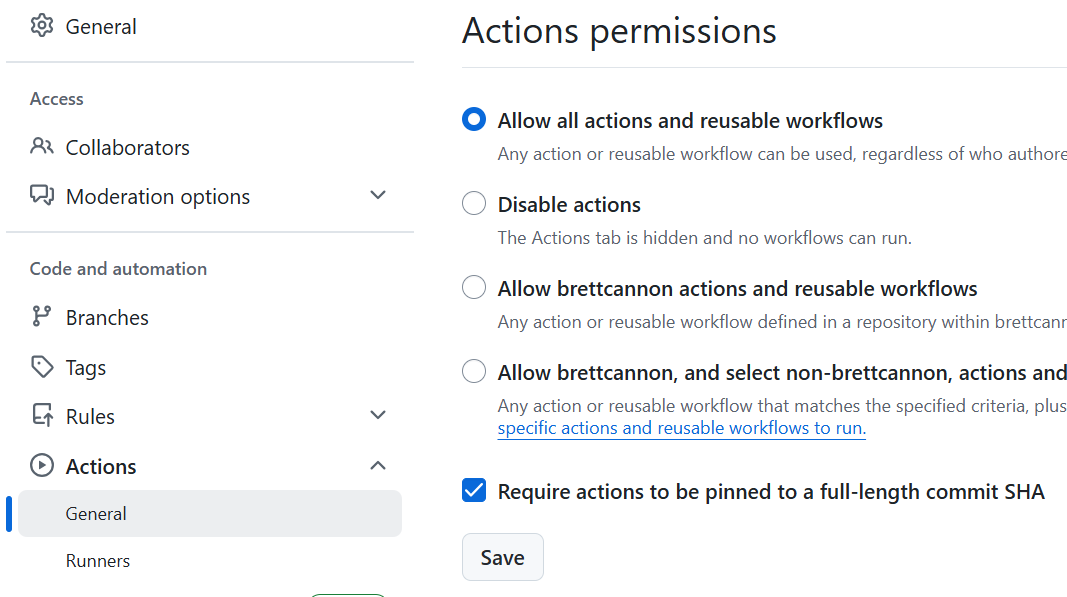
Bonus: Dependabot to keep actions up-to-date
Dependabot will recognize your use of pins, so you can still use it to keep your actions up-to-date (if you so choose; it's okay if you don't want to use Dependabot). The one thing I suggest is using a cooldown so you don't accidentally pick to a malicious update by adding a cooldown of a week to your dependabot.yml:
- package-ecosystem: github-actions
  directory: /
  schedule:
    interval: monthly
  cooldown:
    default-days: 7
Add zizmor to CI
Conveniently, zizmor has an action you can set up in your repo. Using it will cause any issues found to be reported as a code scanning result under the "Security and quality" tab (which can be turned off).
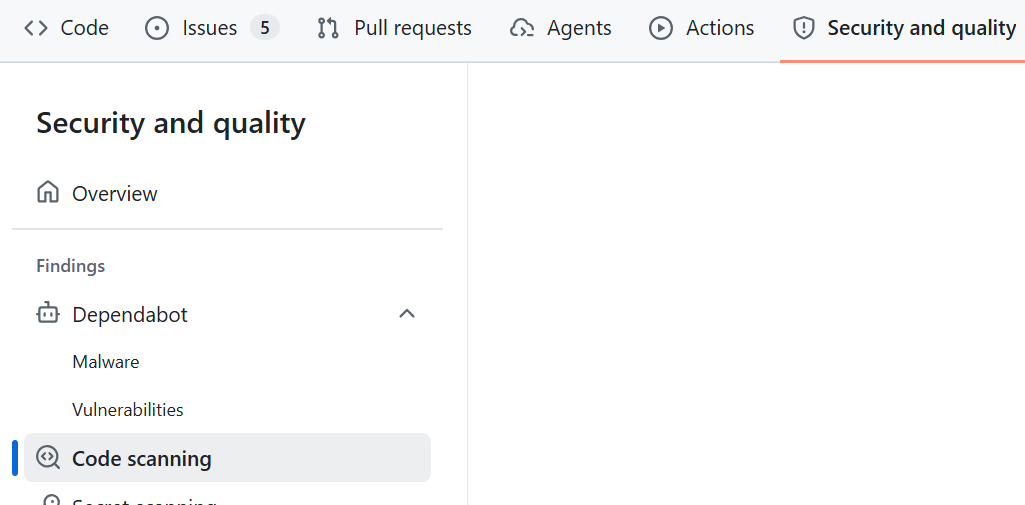
This means the results are private and thus you don't have to worry about exposing anything publicly. You can also use the results as a TODO list if you would find that more motivating to have something to check off instead of getting everything working upfront. As well, if you want to do it gradually this will give you a checklist of things to fix.
You can also run zizmor manually if you want in CI, but I personally just use the zizmor action in a dedicated workflow since the zizmor docs provide such a workflow configuration.
Use Trusted Publishing
If you're going to use GitHub Actions to publish to PyPI, I don't see any reason not to use Trusted Publishing. It means you don't have to manage any API tokens and you can get attestations. Basically it means you get to outsource your security concerns for how you communicate with PyPI for publishing to GitHub's security team.
The one thing you should make sure to do when setting up Trusted Publishing is set up a GitHub environment. The Trusted Publishing docs strongly encourage it and so do I. You can even have the environment do nothing, but doing it now at least gives you an easy option to use it for something later. But I do suggest you use environments to ...
Require approval to publish
The one specific thing I suggest you do with your GitHub environment is require reviewers to run your publishing workflow. The required reviewer can be yourself! But the key point is to require someone to approve the workflow to run.
You might be wondering what's the point if you trigger the release yourself? It's to add a gate to protect against accidental running of your publishing workflow. The accident could be from you or it could be from a malicious actor who has managed to trigger the workflow. By requiring your approval, neither scenario can happen without you clicking that approval button while logged into your GitHub account. And that means someone would need to hack your GitHub account to work around it (and as mentioned above, that means you get to lean on the GitHub security team from preventing that from happening).
Out of everything I have listed, this is probably the most arduous as it's a cost every time you want to do a release. But it's one approval and you're probably already going to be doing something to trigger the release, so you're already online.
And that's it! Those 3 steps get you a long way towards publishing securely from GitHub Actions to PyPI.
Acknowledgments
Thanks to Seth Larson for providing feedback on a draft of this post and giving advice on Mastodon when I posted about these steps. Thanks to William Woodruff for creating zizmor and also giving advice on Mastodon. And thanks to everyone who participated constructively in the discussion on Mastodon.